A DAG offloading platform for edge clusters

Resources and applications, adapting to each other.

OpenSAI picks the right device, resources and parameters for every task in a DAG — resources adapt to the application, and the application adapts to the resources.

The idea

A scheduler usually answers one question. OpenSAI answers three.

  1. Where should it run?

    Each step goes to the device that will finish it soonest, counting the data it has to pull first.

  2. How much should it get?

    Cores, GPU, bandwidth and storage are granted from a speed-up profile learned from real runs — more only where more helps.

  3. How should it run?

    Given a deadline, each step’s knobs — resolution, model width, sample count — are tuned to finish on time at the best quality.

Bidirectional adaptation

Two directions, one decision.

Resource allocation and application tuning are usually solved apart. OpenSAI chooses the device, the core count and the knob settings together, at the moment a step is ready to run.

Direction one

Resources adapt to the application

Every algorithm has a speed-up profile, learned online. A step that parallelises well gets more cores; one that does not gets a single core and leaves the rest free.

Algorithm
Speed-up against coresAmdahl curve for CoopExtract, parallel fraction 0.8.
On an idle 8-core device
8cores
When cores are contended
at least 2cores

CoopExtract gets all 8 cores on an idle device — every doubling still cuts its time by 20% or more. When other steps need cores too, it gets at least 2: the largest power of two that keeps parallel efficiency at 0.7 or above.
Curves follow Amdahl’s law, S(n) = 1 / ((1 − p) + p/n), with each algorithm’s declared prior p, on an illustrative 8-core device. The allocation rules are the coordinator’s: double the cores until the next doubling saves less than 20%; when cores are contended, keep parallel efficiency at 0.7 or above. The online profile refines p from real runs.
Direction two

The application adapts to resources

Give a run a deadline. The coordinator turns it into a time budget for every step and picks, among the knob values each algorithm declares, the best quality that still fits.

comm = 0.5
Relative F1
0.93
ego alone 0.58
Message size
77%
The comm knob of the cooperative-perception example declares 0.1 / 0.25 / 0.5 / 1.0 with relative F1 0.75 / 0.83 / 0.93 / 1.00 and message size 18 / 43 / 77 / 100% (100% is about 75 KB per frame for both collaborators; the ego vehicle alone scores 0.58). Relative F1 was measured by the development team on 54 frames of V2XSet. How the slider maps to a level is an illustration only: in a run, the coordinator derives each step’s budget from the deadline.
And then

Then it learns

Each finished step feeds its measured time back into the profile, so the next prediction — and the next decision — is better.

Dotted: the declared prior. Solid: the profile after measured runs (dots). Illustrative shape.

How it works

From a DAG to a result.

  1. 01

    Describe

    Describe the work as a DAG: steps are registered algorithms, edges carry data from one step to the next. Submit it from the console, the CLI, the SDK or an AI agent.

  2. 02

    Place

    The coordinator scores the healthy devices by transfer time and load, and favours the one that already holds the input.

  3. 03

    Allocate and tune

    At the last moment, when a slot and cores are really free, it fixes the core count and — if there is a deadline — the knob settings.

  4. 04

    Move data

    Outputs travel device to device over QUIC. Same-device hand-offs are read locally; large transfers can be split across a relay or a second network interface.

  5. 05

    Run

    Each device runs its step in a worker with the cores, memory and storage it was granted.

  6. 06

    Learn and recover

    Measured timings update the profiles. If a device drops out, its in-flight steps — and upstream outputs that lived only there — are redone elsewhere.

Recorded walkthrough

Watch OpenSAI adapt in real time.

A narrated tour from edge collaboration bottlenecks and bidirectional adaptation to a recorded four-device cooperative-perception run — across stable traffic, wireless congestion and vehicle departure.

Narration language
1080p60 · narrated Open MP4 ↗
Video streams on demand when you press Play (zero bytes fetched on initial page load). Jump directly to any chapter above, or switch between English and Chinese narration.

Features

What is inside.

  • Placement that looks ahead

    plan mode weighs the whole DAG before placing a step; smart decides step by step. Data locality and a health pre-filter are built in.

  • Late binding

    Steps wait at the coordinator until a device really has a free slot and free cores, so decisions use the load of now, not of submission time.

  • A ledger for every resource

    Cores, GPU slots, bandwidth and storage are committed on dispatch and released on completion, so nothing is promised twice.

  • A multipath data plane

    QUIC between devices, with relay and multi-interface paths for large artifacts.

  • Recovery built in

    2-second heartbeats, a 10-second timeout, lost work redone with its lineage, late results discarded.

  • Profiles that learn

    An online performance model fits each algorithm’s speed-up curve and tracks its own prediction error.

  • Decisions you can read

    Each step’s device, cores and knob settings are recorded with the reason behind them; opensai explain shows them for any job.

  • Apps bring their own knobs

    An app is a manifest plus step code. Declare the knobs with their quality and cost; the platform itself needs no change.

Interfaces

Four ways in.

Console

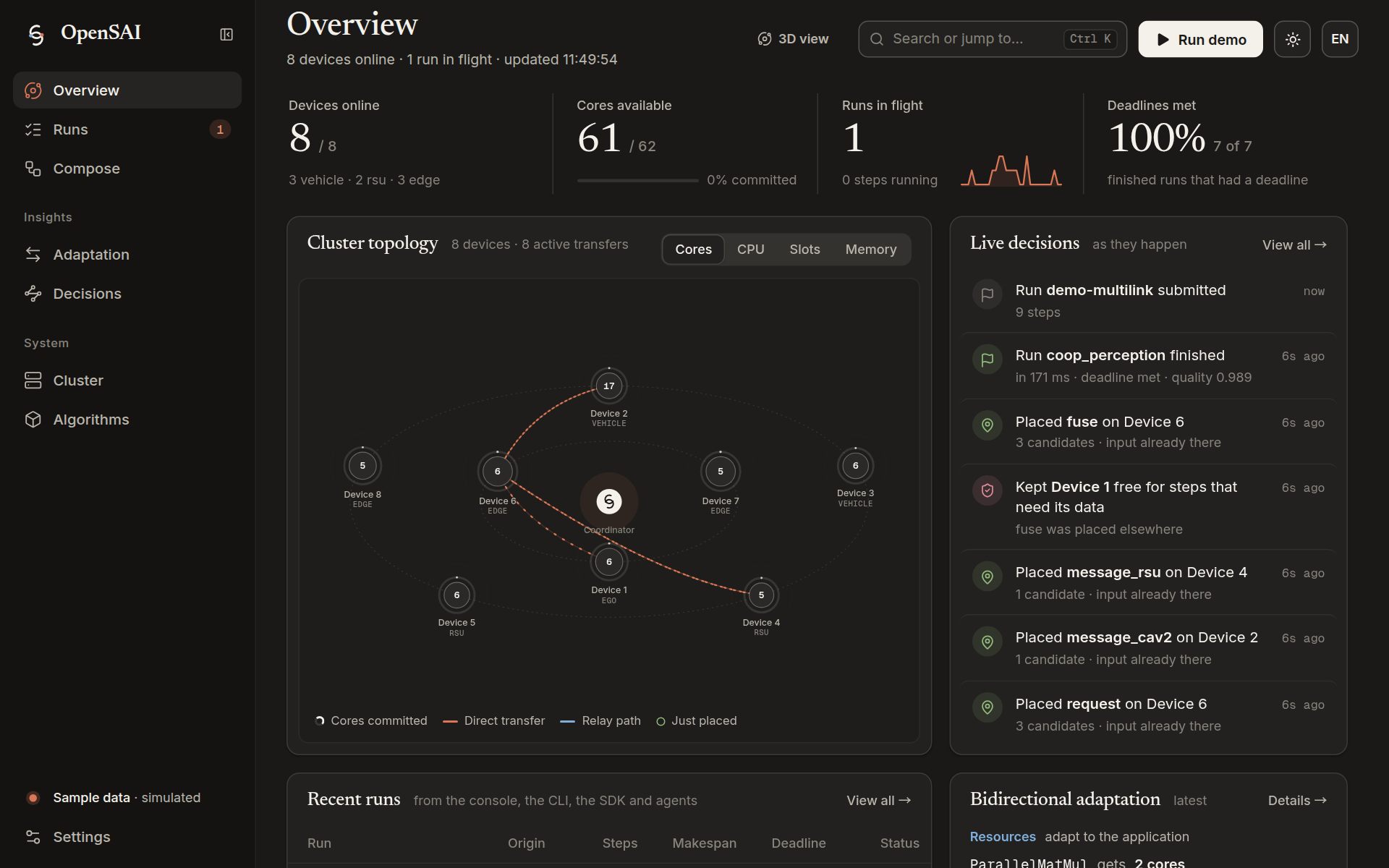
Watch the cluster, compose runs, and read every decision.

It opens at 127.0.0.1:5000 once the platform is running — see Quick start.

The OpenSAI console: cluster overview, runs and the decisions behind them

Example apps

Five apps, each with its own knobs.

  • Cooperative perception

    Vehicles and a roadside unit share only what the ego vehicle asks for.

    knob commdeadline 0.8 s

  • Video counting

    Two cameras, detection per stream, one total.

    knobs resolution, stridedeadline 2 s

  • Cluster analytics

    k-means on two sites’ shards, merged by weight.

    knobs dims, itersdeadline 3 s

  • How2comm perception

    A GPU collaborative-detection model on the edge server.

    knob keepdeadline 1.5 s

  • Number stats

    The smallest possible app: generate, then summarise a sample.

    knob sampledeadline 3 s

Quick start

Running in three commands.

Python 3.10 or newer. Bash scripts for Linux and macOS, PowerShell scripts for Windows.

shell
bash scripts/setup.sh            # virtualenv, dependencies, a private Redis
bash scripts/run.sh --with-web   # coordinator, one device, the console
# open http://127.0.0.1:5000 and press "Run demo"
add another device
python Offloading-System/dag_offload/run_device.py